Using Waypoints Planner
The planner proposes a defensible starting point and shows its reasoning. You decide. Always.
That sentence is the whole tool. Everything the planner generates — unit plans, glossaries, resources, slide decks, student pages — is a baseline: a coherent, teachable default you can run as-is, or push against and replace with better calls drawn from your own practice and your own class. It is not the answer. It is the starting position that saves you from starting blank.
Two kinds of content sit inside every generated artifact, and knowing the difference is the most useful thing this page can tell you:
Derived content traces to the curriculum — the waypoint spine, built from ACARA or BSSS. The order of ideas, what each one depends on, where the risk concentrates. This is checkable, and it is the part worth trusting.
Decided content is the planner's judgment — which activity, which pacing, which example. Defensible, stated with its reasoning, and yours to overrule without ceremony.
The idea underneath
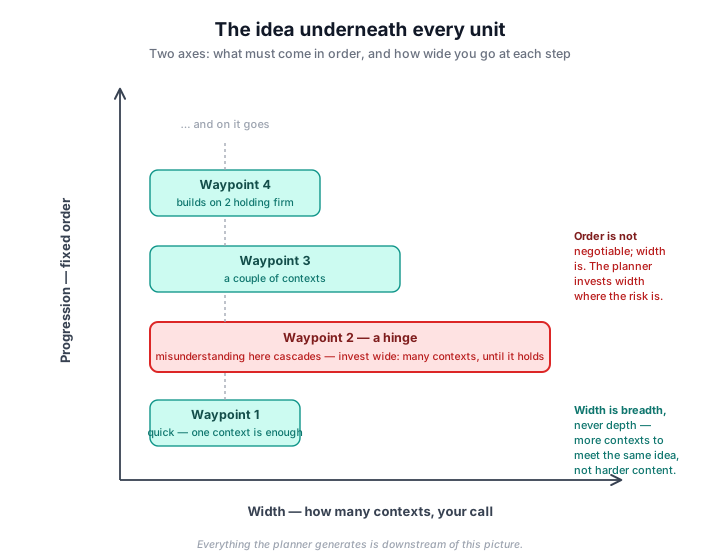
Every unit is a path through waypoints — ideas that must come in a fixed order because each depends on the ones before. That order is the vertical axis, and it is not negotiable: it comes from the curriculum's own dependency structure.
The horizontal axis is width, and width is yours. Width means how many contexts a student meets an idea in — never harder content. A quick waypoint might need one context. A hinge — a waypoint where misunderstanding cascades into everything built on top of it — earns wide investment: multiple contexts, until it holds.
When a lesson in your plan spends what looks like a lot of time on one idea, check whether it sits on a hinge. It usually does — and the plan will tell you why, in that lesson's notes: what breaks downstream if this doesn't hold, and what the misconception looks like when it appears.
The workflow
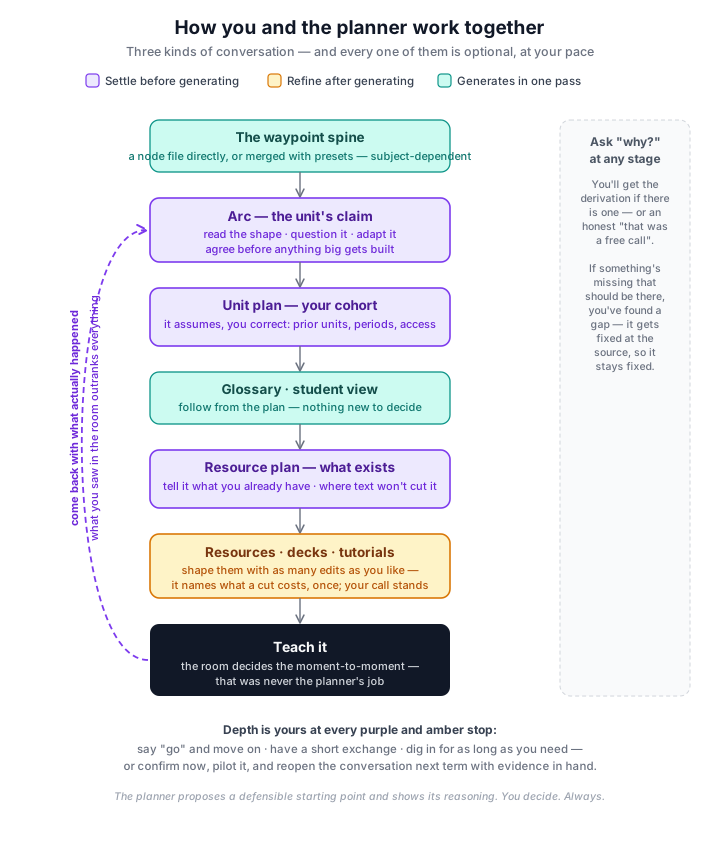
The pipeline runs top to bottom. Each stage generates from the ones before it, and you review at the boundaries — by pasting a prompt into your AI tool of choice, and pasting the result back. Nothing runs behind your back; there is no account, no server, and none of your class's data leaves your machine.
Then you teach it — and the moment-to-moment calls (when to step in, how long to let struggle run, what to reveal to whom) were never the planner's to make. Where a lesson touches one of those, the plan names the decision as yours rather than pretending to have made it.
Deciding now, or deciding later
Before the unit plan generates you choose full plan or sketch. It is one click, and it is the decision with the longest reach in the tool — worth a minute before you make it.
Both write the same skeleton: lesson allocation, each lesson's mode and shape, the watch-outs, the success criteria, the preambles. They differ on four fields per lesson — the support strategies, the main tasks, the extensions, and the relief-teacher notes. Full writes them now. Sketch leaves them marked as unwritten, and you fill each lesson in shortly before you teach it.
Those four are the parts that depend on how this class actually goes — what landed last lesson, where they rush, what you have in the room. Before you have taught any of it, nobody knows. Full density does not know either; it just commits to a reasonable guess earlier, on the same information sketch would have waited on. That is the whole trade: not a careful option and a rushed one, but the same guess made now or made later, once there is something to base it on.
Sketch is worth it when the unit is new to you or the class is, when it is long enough that a full plan is more than you can hold in your head, or when you know something will change once you start teaching. Full is worth it when you have taught this before and want the whole thing to review in one sitting, when you are handing it to someone else, or when the unit starts next week and you would rather decide once.
What sketch costs. A short conversation per lesson, close to teaching it — it asks what you have seen, you answer, the lesson fills in. That conversation is not optional: choosing sketch was choosing to have it later. It also means the resource plan arrives in two halves — what must exist now, how it is used once you have said. And it only pays off if you elaborate as you go. Sketching a unit and then elaborating all forty lessons in one sitting gets you the extra step without any of the knowledge it exists to collect; if that is the plan, generate the full plan instead.
You are not locked in either way. A full plan can be edited freely, and a sketched unit has Start elaboration over — every lesson back to its skeleton, resource plan included.
The stages at a glance
Expand any stage for the full picture: what it reads, how it decides, and what constrains it. The short version of everything below: decisions flow down, evidence flows up — and the further from the spine, the more is yours.
Waypoint spine The grounding: waypoints in order, hinges, misconceptions
Reads: the curriculum itself — ACARA content descriptions or BSSS unit documents — through subject-specific derivation rules. Some subjects merge a capability spine with a project or text pathway and your presets; for others the node file is the spine directly.
Decides: what counts as a waypoint, where the hinges are, what each checkpoint looks like — derivation calls made against written rules, and audited against them.
Constraints: every checkpoint must trace to the curriculum. Width always means breadth, never harder content. A hinge must name its cascade — what specifically breaks downstream.
Yours: presets and pathway choice where your subject uses a merge. The order itself is checkable against the curriculum, so challenges to it are recorded rather than absorbed. If you find something missing — a term, a concept never captured — that's a real find, and it gets fixed here, at the source, for good.
Arcarriving The unit's claim on one page, before the big build
Reads: the spine, plus your brief — the design challenge or statement of intent where one exists.
Decides: how to state the unit's argument — which is itself a reading, and arguable. That's the point: you argue with a page, not with forty lessons.
Constraints: it may claim nothing the spine doesn't support, and it must state its cohort assumptions rather than hide them.
Yours: nearly everything, cheaply. Structure your subject's workflow didn't capture — "run it as three cycles, checkpoint after states of matter" — can be supplied in plain language here; the planner translates, plays it back, and confirms before committing.
Unit plan Lessons: allocation, mode, shape, pacing, watch-outs
Reads: the spine in full — hinges and their reasons, misconceptions, checkpoints, success criteria — plus the glossary.
Decides: lesson allocation; each lesson's mode and internal shape; pacing across faster and slower runs of the room; the per-lesson watch-out; the preamble explaining why each waypoint matters here. Hinge waypoints get the time and the concrete support — the plan must address each hinge's specific cascade directly. That's a rule it's generated under, not a habit.
Constraints: the spine's order is fixed. Roughly period-sized lessons. In-the-moment decisions are named as yours, not scripted. Invented specifics never appear as settled fact.
Yours: the pacing columns and activities are one defensible playing of the sequence — the most "decided" content in the pipeline, and the most freely replaceable. The allocation and ordering underneath are derived; worth checking before rearranging rather than after.
Full plan or sketch: a choice next to the generate button, made once and felt everywhere downstream — see Deciding now or deciding later above.
Elaboration (sketch only) Filling in a lesson, close to teaching it
Reads: the lesson's own skeleton and its waypoint, plus the lessons in this unit you have already elaborated — so it knows what came before and does not re-teach it.
Decides: nothing on its own, where the sketch left a call open. It shows you the lesson, names what is unsettled and why, and asks. This is not an optional pause — choosing sketch was choosing to have this conversation later, so it happens wherever a lesson still has gaps.
What's worth telling it: how the last few lessons actually went, what this group finds hard or races through, what you have and haven't got, or simply how you want this one to run. The equipment kind is the easy one. "They went quiet when I asked them to explain their reasoning" is the one that changes a lesson.
"Your call" is a real answer. If you haven't taught toward the lesson yet, say so. You get its best read, marked as a starting position rather than a settled choice — which is the honest state, and better than a confident guess that hides it.
Yours: everything, as always. The grounded parts of the sketch expand as written unless you say otherwise — say otherwise and they change. And Start elaboration over puts every lesson back to its sketch, resource plan included, if you would rather begin again.
Glossary Every term, defined at student level, placed at first teaching
Reads: the spine — the terms live in the waypoints' own vocabulary. Generated once, standalone, after the spine settles.
Decides: what counts as a term worth defining, and the wording. Placement follows from where a term's waypoint sits — that part isn't decided.
Constraints: definitions at the level of a student meeting the term for the first time. No term without a teaching position.
Yours: wording, freely. A missing term is the more valuable find — usually a spine gap, and reporting it fixes every future generation, not just this file.
Resource plan The build queue: what artifact, what's in it, why that lesson
Reads: the unit plan — deliberately its only grounding, as a fence against inventing resources from general subject knowledge.
Decides: which lessons need built support; artifact type and form; the design notes each resource is later built from. A hinge lesson's consolidating support becomes a concrete named artifact; a checkpoint gets its page.
Constraints: text-producible forms only — a card sort becomes a numbered list — and where a lesson genuinely needs what text can't carry (motion, a live process, an interface), the plan flags it for you to source rather than pretending. Design notes describe contents, never classroom choreography: how a resource is deployed stays with you.
Yours: everything, entry by entry — swap forms, cut entries, substitute what you own. Entries you replace with existing materials cost nothing; that's the tool working, not being corrected.
From a sketch: a smaller inventory, and each entry says what must exist and what goes in it, but not how students meet it — that depends on the support strategy the sketch deferred. Those entries are marked, so nothing downstream invents a use and presents it as your choice. As you elaborate lessons, Update resource plan fills the missing half in and adds whatever the new strategies named. The plan only ever grows: nothing is renumbered, and anything the planner thinks is no longer needed is shown to you with its reason rather than removed.
Order matters once: elaborate a lesson, update the plan, then build that lesson's resources. Building first means building from an entry that doesn't yet know how the artifact is used.
Resources — the built layer Supporting · tutorials · slides
Supporting resources — printable scaffolds, references, checkpoint pages, built from each plan entry's design notes with the glossary for consistent terminology. Every one carries a baseline all students get, with clearly marked wider layers for students ready for more contexts — width as breadth, on paper. Invented data is labelled illustrative; fabricated numbers never pose as observations. All of it is built for your red pen — the one thing worth knowing before cutting a section is whether it's the lesson's only repair of a named misconception, and the planner will tell you. Then it's gone if you say so.
Tutorials — self-paced steps for build work, generated by cycle so they cross-reference instead of repeating. Steps and pacing are yours to reshape.
Slides — the projected layer, following each lesson's frame. Deck length follows the lesson's mode, not a quota: a concept-heavy hinge lesson earns a long deck, a checkpoint barely needs one. Speaker-note choreography is a default playing, labelled as such, and cohort references live in speaker notes marked adjustable — so an assumption about prior units never gets baked into slide text.
Student view Renders the unit for your class
Reads: the unit plan's structure, the glossary, and each resource's delivery category — which access modes its content belongs in.
Decides: almost nothing, deliberately. It's a faithful rendering; the decisions were all upstream.
Yours: what's exposed and when — it follows your plan, so it changes by changing the plan, which keeps the class page and your teaching in step automatically.
Talking to itarriving
Three kinds of conversation run through the workflow, and all three are optional, at your pace — the first of them literally so: it is a switch you turn on.
Settling happens before the big generations — the arc, the unit plan, the resource plan. The planner states its assumptions and its defaults ("I'm assuming 50-minute periods and that this class has run a design cycle before — correct me or say go"), and asks only what it genuinely cannot know: your cohort, your timetable, what you already have so it doesn't build duplicates. Say "go" and you get the default. Correct one thing and everything downstream inherits the correction. This one is a choice you make before generating — talk it through first, next to the generate button. Off by default, because most of the time you want the artifact. It earns its keep on the long generations and on a unit you have never taught. Elaborating a sketched lesson is the one place it isn't a choice: there the conversation is the point, not an addition to it.
Refining happens after — on the resources and decks. Edit as much as you like. Where an edit touches something load-bearing, the planner names the cost once — "cutting that removes the only repair of X; gone, or compressed?" — and then your decision stands. It advises with the spine's knowledge; it never overrules with it. You may know Tuesday's discussion already handled that misconception. It can't know that. That is exactly why the call is yours.
Asking why works at every stage, on anything. "Why does gradient enter in lesson 4?" gets you the derivation if there is one — and an honest "nothing placed it there; that was a free call, movable" if there isn't. And if you ask about something that should be there and isn't, you've found a real gap: the planner will say where it belongs, so it gets fixed at the source and stays fixed.
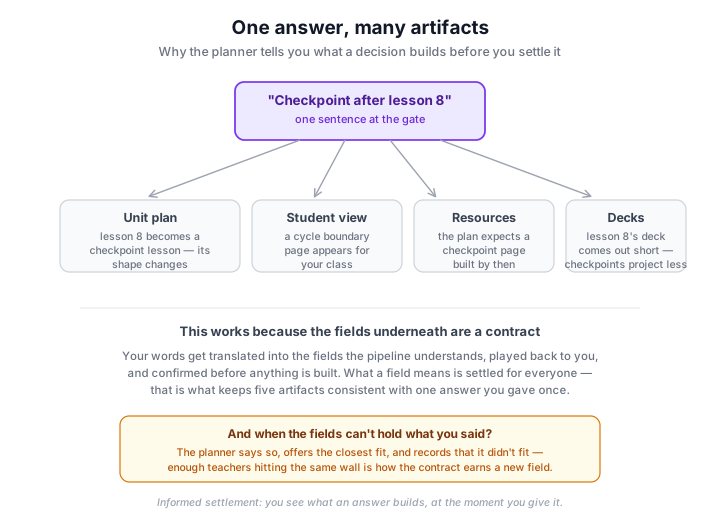
When you settle something, the planner tells you what that answer builds — because one sentence at the gate can shape four artifacts downstream, and you should see that at the moment you decide, not four stages later.
Your pace, your depth
Every conversation runs from zero turns to as many as you want. "Go" on first read is using the tool correctly, not skipping something. So is a long argument. So is sleeping on it and coming back tomorrow — the conversation lives in your chat window and nothing expires.
And the strongest move of all: confirm now, teach it, and come back with what happened. What you saw in the room outranks every assumption the planning conversation ran on. Each load-bearing call ships with the signal that would say it's wrong for your class — and returning with "the signal showed up in lesson 9" reopens exactly the right conversation with exactly the right evidence.
Living with the unitarriving
Generation ends; the term is just starting. The planner produces one more thing for that: a companion document, written for reading moments rather than cover to cover.
Before you commit — the arc, one page. Read it before the big generation runs; this is the cheapest moment to catch a wrong unit, and the conversation to fix it is right there.
Before term — orient. The arc as actually built: what generation decided, the assumptions worth checking, the handful of calls worth your judgment. Fifteen minutes, once — after this, the forty-lesson plan reads as instances of a shape you already hold.
If you sketched — each lesson, shortly before you teach it. A few minutes: it asks what you have seen, you tell it, and the lesson fills in. This is the moment the sketch was waiting for, and it only works because you have taught the lessons before it. Doing them all in one sitting gets you the mechanism without the knowledge.
At each cycle boundary — that cycle's section. What becomes load-bearing next, what should already be true if the last cycle worked, and the signals to watch. You don't re-read the unit; you read the two pages that matter this fortnight.
After the unit — come back. What you saw is evidence nothing else can supply, and next term's version of the unit starts better than this one did.
What the planner will not do
Make the in-the-moment calls. Intervention, pacing on the day, how much to reveal — named as yours, never forecast.
Present its inventions as facts. Invented examples and illustrative data are labelled as such. If a worked example needs real numbers, it asks you to capture your own rather than fabricate observations.
Bend the curriculum to agree with you. Challenge a dependency or a hinge and it will hold — and name the data it's holding on. It records the disagreement rather than conceding it, because the spine is checkable and the conversation isn't the place it changes.
Cave, or dig in. It concedes when you bring something it couldn't know — your class, your context, your observation. It holds when the grounding answers. Either way it tells you which is happening.
When something doesn't fit
Sometimes what you need has no home in the pipeline's structure — a constraint the fields can't hold, a resource type it can't produce, a term it never captured. The planner's job then is honesty, not improvisation: it says so, offers the closest fit, and records the miss. Those recorded misses are not lost — enough teachers hitting the same wall is precisely how the pipeline earns a new field, a new resource type, a new capability. Your friction is the evidence the tool improves on.